
📋 Groups and Permissions
Note:
|
Custom Groups
With the help of groups, you can individually set what rights a specific user group should have. The administrator can create an unlimited number of groups and assign individual rights to them.
A user can be added to multiple groups. (Note: conflicts may occur if restrictions are defined differently in groups.)
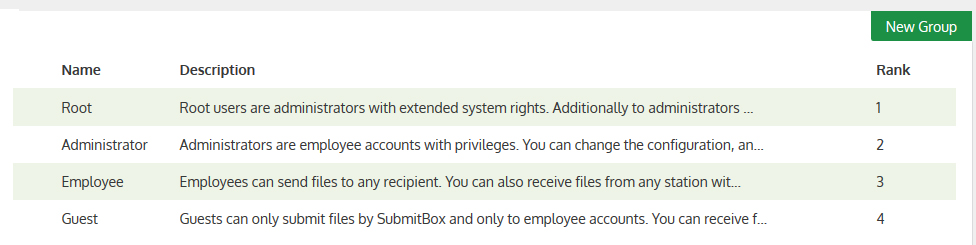
In the web interface, groups can be found in the navigation under Administration > Groups and are displayed as follows:
- Name of the group
- Description
- Rank of the group
Permissions of users who are in multiple groups
A user can be in multiple groups at the same time. This makes it possible to set the permissions for a user very flexibly.
This section describes how these permissions are composed:
Cumulative
Permissions of this type are added together, meaning the user receives the values from both groups.
These include:
- "Whitelist for delivery recipients"
- "Blacklist for delivery recipients"
- "IP address restriction"
- "Blacklist for file types"
- The groups of the "Address book"
- All delivery security levels
Example:
Group1 has *.zip in the "Blacklist for file types" and Group2 has *.exe here. If a user is now in both groups, they are not allowed to send *.zip or *.exe files.
Group1 is only allowed to send level 1 deliveries and Group 2 is only allowed to send level 2 deliveries. If a user is now in both groups, they are allowed to send level 1 and level 2 deliveries.
Priority
For permissions of this type, it is decided whether the setting is activated depending on which group has a higher rank.
It should be noted here that this is only important for users who are in multiple groups. If, for example, only one group is assigned to each user, the priority of the groups is completely irrelevant.
These include:
- "User account cleanup" -> All settings
- "Delivery cleanup" -> All settings
Example:
Group1 has "User account cleanup" deactivated, Group2 has it activated. Group1 has rank 2 and Group2 has rank 4.
There is also a Group3, which has rank 1 and has cleanup activated.
If a user is now in groups 1 and 2, the cleanup for their account is deactivated (regardless of Group3, as they are not a member of it).
Dominant
For configuration values of this type, the largest value is always chosen.
This is independent of the group's rank.
These include:
- "Max. file size for WebUpload"
- "Maximum storage"
- "Address book" -> "Activated"
Example:
Group1 has 200 MB maximum storage and Group 2 has 500 MB maximum storage.
If a user is now in both groups, they have 500 MB maximum storage (regardless of the group's rank).