
📋 User Account Cleanup: Automatically deactivate or delete inactive accounts
What is the purpose of user account cleanup?
User account cleanup helps you automatically clear your FTAPI system of inactive user accounts. This ensures a better overview, frees up unused licenses, and increases security by removing or deactivating orphaned accounts. By default, this function is disabled, as it should be configured according to your specific use case.
Configuring the cleanup
The setup is performed in two steps: First, the function is enabled globally, and then it is configured in detail for the respective user groups.
Step 1: Global activation
First, navigate in the administration to System > User Account Cleanup and enable the function. Here you can also set the interval at which the cleanup job should be executed.
Step 2: Detailed settings at group level
The actual configuration of which accounts are cleaned up, when, and how is done at the group level. Navigate to Administration > Groups, select the desired group, and scroll to the "Cleanup" tab.
Here you can make the following settings:
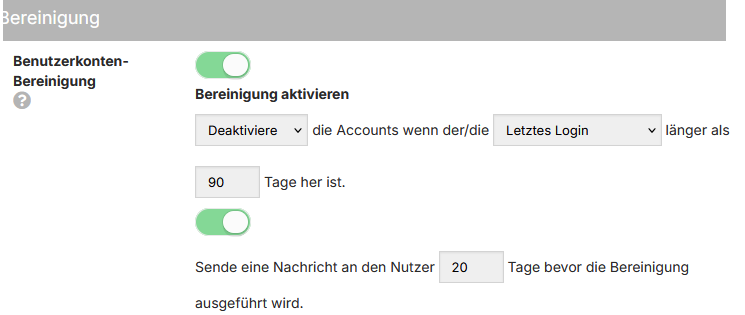
- Action: Determine whether inactive accounts should be deactivated or permanently deleted after the period has expired.
- Criterion: It is recommended to use the Last Login Date as the basis for the period calculation, as this reflects actual user activity. If a user has never logged in, the creation date (Created Date) is used as a fallback value.
- Period: Define after how many days of inactivity the action should be executed.
Best Practices: Recommendations for practice
Depending on the type of user account, different approaches are recommended.
Recommendation for guest accounts
It is recommended to have inactive guest accounts (e.g., from external communication partners) automatically deleted after a reasonable period, for example, 90 days. Since a new guest account is automatically created upon a new delivery to the same email address, there is no disadvantage here.
Recommendation for employee accounts
Accounts of internal employees should ideally only be deactivated and not deleted. A deactivated account no longer occupies a license but can be easily reactivated by an administrator if necessary (e.g., when an employee returns).
Special case: Handling SAML accounts
Please note that deactivated SAML accounts differ from standard database users.
A deactivated SAML account is automatically reactivated upon a successful login via the Identity Provider (e.g., Azure AD). To prevent this, the user's corresponding group assignment must be revoked directly in the Identity Provider.
Important notes
What happens when an account is deleted?
Deleting a user account is an irreversible process. The following data will be lost:
- Saved passwords and the SecuPass
- Deliveries in the inbox and outbox
- Memberships in SecuRooms
However, files that the user has uploaded to SecuRooms remain. The corresponding storage amount is transferred from the deleted user's quota to the general system quota.