
❓ SecuRooms: Why do I receive an upload failed message?
Cause of the upload error
If you receive an Upload failed error message when uploading files, the file may contain invalid characters.
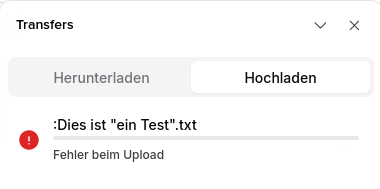
FTAPI prioritizes maximum compatibility. This means that a file name should be valid across as many operating systems as possible. A specific special character (e.g., a colon) is possible in a file name under Linux, but not under MacOS or Windows.
Allowing these special characters would therefore mean that file exchange might no longer be possible without restrictions.
Recommended naming convention
We therefore recommend using alphanumeric characters from the English alphabet. Additionally, the special characters hyphen (-) and underscore (_) can be used.
Allowed characters:
- a-z
- A-Z
- 0-9
- - (hyphen)
- _ (underscore)
Microsoft also recommends avoiding special characters whenever possible:
https://learn.microsoft.com/de-de/windows/win32/msi/filename