
FTAPI Version 4.59.0
Admins are now notified about expiring SAML certificates to ensure uninterrupted system usage.
Published on 18.12.2025.
New
Administration
- Notification about expiring SAML certificate: To ensure the availability of Single Sign-On (SSO), administrators will now be notified via email as soon as the SAML certificate expires in less than 35 days. The weekly repetition of this message enables proactive certificate management for uninterrupted system usage. Learn more.
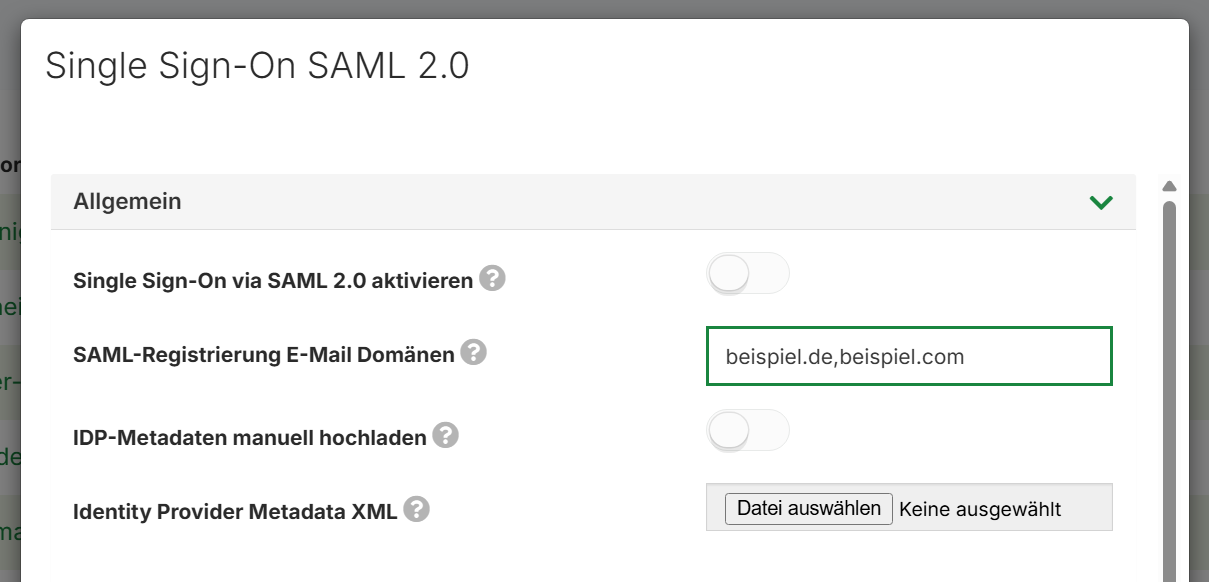
- Single Sign-On – Better user experience & correct permissions: New users with an email domain configured for SSO are redirected by FTAPI directly to the SSO login page upon first contact (for deliveries and SecuRooms). This allows the system to correctly adopt permissions via SSO immediately, and avoids redundant registration with username and password. This improvement applies to SAML-based SSO configurations.
To activate, email domains must be stored in the Administration under System category Single Sign-On SAML 2.0:
Improved
SecuRooms
- Error messages in SecuRooms have been revised so that users are better informed about the specific error.
- In the new navigation, only the folder where the user is currently located is visually highlighted.
- When a user creates or renames a folder, the data entry field is visually highlighted and the user can start typing immediately.
- If a user deletes the data room they are currently in, they will be redirected to the data room overview.
FTAPI cloud customers do not need to take any action; the update happens automatically. Customers can receive detailed information about the maintenance window via status.ftapi.com.
Information for On-Premises
Customers with an on-premises operating mode please follow the instructions in the update guide. Click here for the download area.