
📋 SSO: Adjusting token lifetime on ADFS server via PowerShell and console
This article is a guide for administrators on how to adjust the validity period of the SAML authentication token on an ADFS server.
Reading the current validity period
The current validity period (in minutes) can be read using the following PowerShell command:
Get-AdfsRelyingPartyTrust -Name "<YOUR_SERVER>" | Select -expand TokenLifetime

Adjusting the validity period
The value can be adjusted using the following PowerShell command:
Set-AdfsRelyingPartyTrust -TargetName "<YOUR_SERVER>" -TokenLifetime <YOUR_VALUE>
Adjust the "Web SSO lifetime" in the ADFS console under "Service" -> "Federation Service Properties" accordingly:
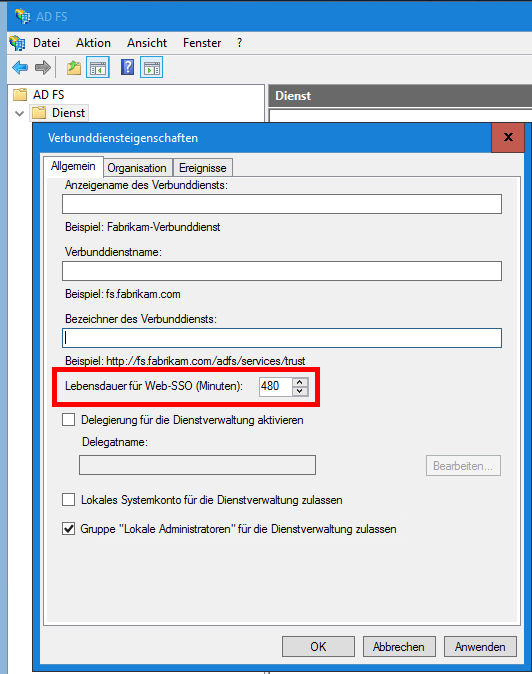
The server service must be restarted to apply the changed configuration.
Related articles
❓ SSO: Why does the user have to log in again daily despite Single Sign-On?