
📋 SecuPass: Activate and set up end-to-end encryption (E2E)
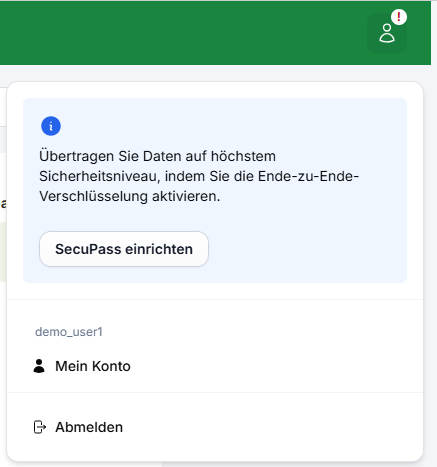
If you have not yet activated end-to-end encryption, you will find a red exclamation mark (!) in the top right area of your FTAPI account. Clicking on this button opens a modal where you can select the option "Set up SecuPass".
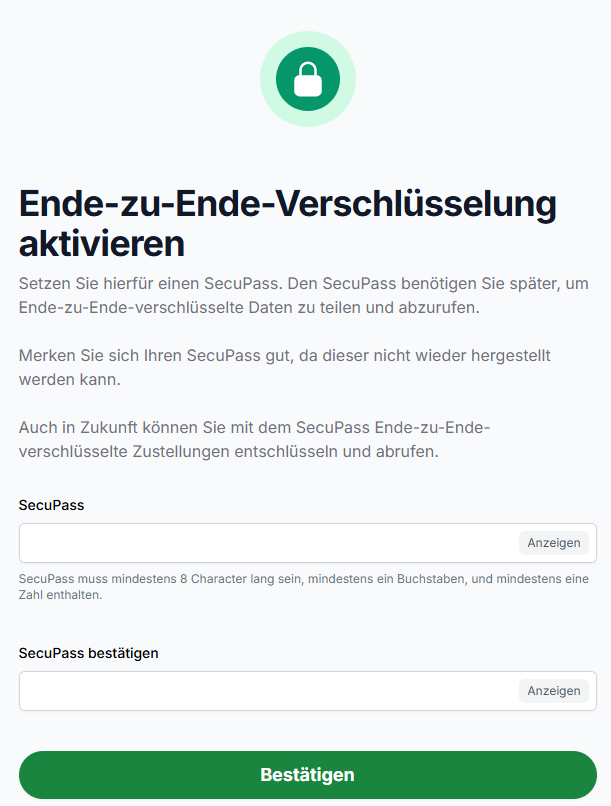
Now set your SecuPass for end-to-end encrypted communication and confirm the SecuPass by entering it again.
Done!
As soon as the SecuPass is set, you can send and receive messages with end-to-end encryption (FTAPI security level 3 and 4). If the SecuPass has not yet been created, you will be prompted to set it up beforehand.
IMPORTANT: Do not forget your SecuPass! All data received with end-to-end encryption is irretrievably lost and cannot be restored even after resetting the SecuPass.
Activate SecuPass as a recipient
An employee sends a delivery with security level 3 to a new recipient. In order for the recipient to be able to decrypt the attached file, the receiving person must first create an FTAPI account and set the SecuPass.
If this has not yet been done, the recipient must first create the SecuPass and then wait for authorization from the sender in order to be able to decrypt the attached file.
For authorization, the sender of the message must enter the SecuPass again. This is indicated to the sender by a message in the browser window. As soon as the SecuPass has been entered, the recipient can decrypt the attached file.
Note: This process is only necessary for the initial authentication of the recipient.
Forgot your SecuPass, what to do?
In this article, you will learn what to do if you have forgotten your SecuPass
To the article