
📋 Limits: Configuring size and download limits per group and product
Overview: Group-based configuration
In FTAPI, size and download limits are not set globally but are flexibly defined at the user group level. This allows you to assign individual permissions to different departments or user circles. You can find all relevant settings in the administration under Groups.
Types of size limits in group settings
Within a group's configuration, you can define various limits to control usage.
Maximum attachment size for web upload
This setting under Restrictions defines the maximum total size of all files that a member of this group can send in a single delivery via the FTAPI web interface.
Maximum storage space per user
Here you define the total storage capacity (quota) available to each member of the group for their data (e.g., in SecuMails and SecuRooms).
The quota ("Maximum storage") can be adjusted via Administration -> Groups:
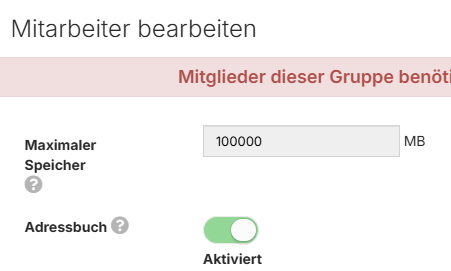
If the value -1 (=unlimited) is entered here, the quota of the group members is set to the system quota.
Special case: Users in multiple groups
If a user is a member of multiple groups with different limits, the principle of the "dominant" (largest) value applies to storage and upload restrictions. The user always receives the most generous limit of the groups they belong to, regardless of the rank of the respective group.
Example:
- Group A: Maximum storage = 500 MB
- Group B: Maximum storage = 2 GB
A user who is a member of both groups has a maximum storage space of 2 GB.
Limits for specific products
In addition to general group-based settings, there are product-specific features.
FTAPI SubmitBox
By default, files of up to 100 GB can be submitted via the SubmitBox. Administrators can adjust this limit if necessary. To do so, navigate to: SecuForms > Configuration > Edit global SubmitBox template > Custom fields > Files and change the value under Maximum file size.
FTAPI SecuRooms
In SecuRooms, files of up to 500 GB can be uploaded and downloaded without any issues. This applies to data rooms both with and without end-to-end encryption.
Web deliveries (SecuMails)
Files and data sets can be sent flexibly in all security levels via the web user interface:
- Security levels 1 to 4: Regardless of the chosen encryption (including end-to-end encryption), several gigabytes of data can be transferred securely without any issues.
- High data volumes: Modern web technology enables the stable transfer of even very large files (e.g., 40-80 GB) while maintaining the highest security standards.
Important note: Storage space and trash bin
Please note that deleted files are first moved to the trash bin and continue to count towards the user's storage quota. The trash bin is a feature to prevent data loss and is only visible to administrators. Therefore, a user can only effectively free up their storage space if the files are permanently deleted from the trash bin.