
📋 Email delivery: Emails are not arriving or are landing in spam (DNS configuration)
Common causes for undelivered emails lie in missing DNS records. For example, an insufficiently configured SPF record can cause the receiving mail server to classify your email as unauthorized.
Furthermore, missing DKIM signatures can lead to the email being rejected by the receiving system.
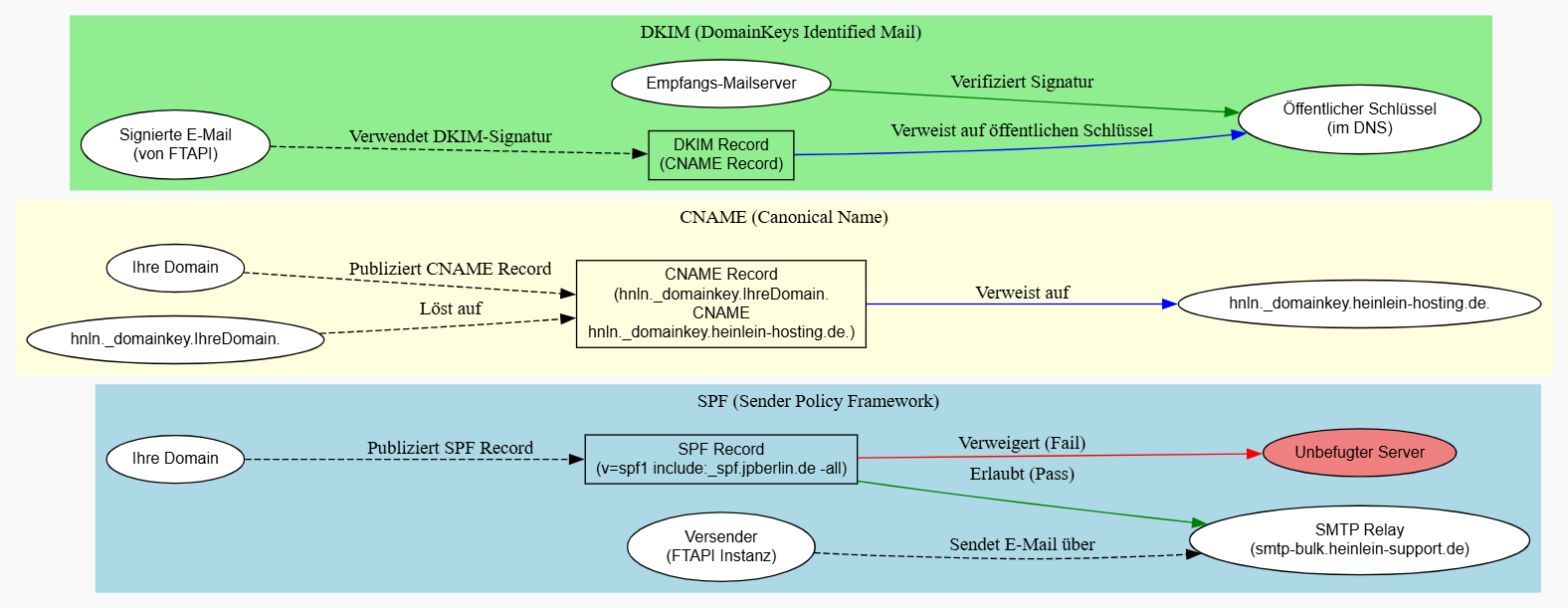
Configuration: Check DNS records
Please check the following points in your DNS settings:
1. SPF record
Your DNS record must contain the following SPF record:
include:_spf.jpberlin.de
This entry authorizes the SMTP relay server smtp-bulk.heinlein-support.de to send your emails.
2. CNAME record (DKIM)
For the DKIM configuration, a CNAME record must therefore be stored. The email signed by FTAPI must contain a valid DKIM signature. This is only possible if the CNAME record is correctly implemented and the public key is retrievable in the DNS.
The correct entry is:
hnln._domainkey.YourDomain. CNAME hnln._domainkey.heinlein-hosting.de.
Attention: Replace YourDomain with your actual domain and create a ticket with FTAPI support. We will then instruct our hoster to activate DKIM for your domain.
Insufficiently configured DNS records can lead to permanent delivery issues in connection with the SMTP relay provided by FTAPI.