
📋 Group Management: Configuring Permissions, Licenses, and Priority Rules
Managing groups and permissions
In FTAPI, permissions and licenses are managed via groups. Every user must belong to at least one group.
Basics of group management
Under Administration > Groups, you can create an unlimited number of custom groups. For each group, specific rights and licenses for products such as SecuMails or SecuRooms can be enabled. Assigning a user to one or more groups can be done either directly when creating the user or at any time later via their user profile.
Handling multiple groups per user
A user can be a member of several groups simultaneously. The resulting permissions are combined according to fixed rules:
- Cumulative: The permissions are added together.
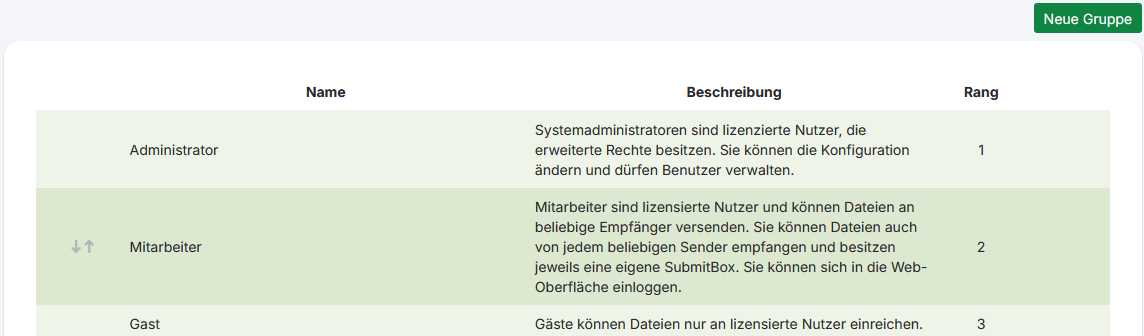
Example: If the file extension*.zipis blocked in Group A and the extension*.exeis blocked in Group B, a member of both groups is not allowed to send either of these file types. - Priority: The setting of the group with the highest rank (for 1 and 2, this is 1) applies. The rank is a number that determines the precedence of a group in case of conflicting settings. (see screenshot, to the right of the group)
Example: Group A has rank 2 and user account cleanup is deactivated. Group B has rank 4 and cleanup is activated. For a member of both groups, cleanup is deactivated, as Group B has the higher rank and its setting therefore takes precedence. - Dominant: Here, the higher value is always chosen, which provides the user with more resources, regardless of the group's rank.
Example: If Group A grants 200 MB of storage and Group B grants 500 MB, a member of both groups will have 500 MB available.
Important group-specific settings
Within each group, you can make detailed settings to precisely control the use of FTAPI:
- Features: Determine which FTAPI products (e.g., SubmitBox, SecuRooms) and functions are available to group members.
- Restrictions: Define technical limits, such as the maximum size for file attachments or the total available storage per user.
- Cleanup: Set up automatic routines for deactivating or deleting inactive user accounts or expired deliveries.
- Security levels: Restrict which security levels are available for sending deliveries or for SubmitBox submissions.
- Two-factor authentication (2FA): Enforce the use of 2FA (via app or SMS) for all members of a specific group to increase login security.
Groups and SecuRooms data rooms
A user group can be invited to a SecuRooms data room or folder as a whole. All members then receive the same access role without having to add each person individually. The invitation itself happens inside the data room and is reserved for users with the System Administration role. Two points matter for group management:
Requirement: SecuRooms access feature
Only groups whose Features include access to SecuRooms appear in the invite dialog. If the feature is disabled, the group cannot be invited to a data room, not even by an administrator.
Changes to the member list take effect immediately
If a group is invited to a data room, changes to its member list affect data room access right away:
- A new member gets access to every data room and folder the group is invited to, with the group's role.
- A removed member loses the access granted by this group. Individually granted access and access through other groups remain.
- If the group is deleted, all of its data room access is removed.
- Changing a member's rank has no effect on data room access.
Before deleting a group, check whether it is invited to any data rooms.
Related articles
📋 User management: Creating user accounts manually, automatically, or via AD
📋 SecuRooms: Invite and manage user groups in data rooms