
📋 SecuRooms: Configuring the validity period for invitation and registration links
The validity of SecuRoom invitations
When you share an FTAPI SecuRoom with an external user who does not yet have an account on your system, an invitation email containing a registration link is sent. The validity period of this invitation is an important aspect to ensure that the recipient gains access in a timely manner.
Dependency on user registration
The validity period of a SecuRoom invitation for new users cannot be set directly within the SecuRoom itself. Instead, it is directly linked to the global system settings for user registration. A SecuRoom share that requires registration uses the same validity period as a general activation link for new users.
Default validity period
By default, the validity period for these registration links is 72 hours. If the invited user does not use the link within this time window, the invitation expires and access to the SecuRoom can no longer be established. In this case, a new invitation must be sent.
Adjusting the validity period
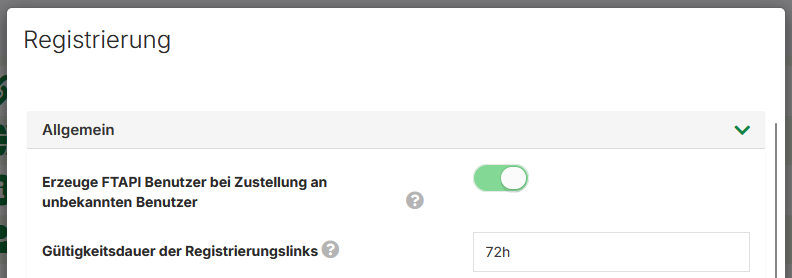
As an administrator, you can adjust this default value to meet the needs of your organization. You can find the relevant setting in the administration interface under the following path:
Administration > System > Registration
In the "General" tab, look for the field:
Validity period of registration links
This field controls the validity for registrations of new users after they have received a SecuRoom invitation or a download link.
For the adjustment, you can use the units d (day), h (hour), m (minute), and s (second). A value of 7d, for example, sets the validity to 7 days.
Note on self-registration
In the "Self-registration" tab, there is a separate setting called "Validity period of the activation link for self-registrations". However, this only affects users who register themselves via a public form and has no impact on direct invitations to SecuRooms.