
📋 System: Configuring Login Disclaimer (Terms of Use) for Users
What is the login disclaimer?
With the login disclaimer (referred to as "usage notes" in the administration), you can specify that users must accept a terms of use agreement upon their first login. Only after the user agrees to the terms you have set can they use the FTAPI platform.
This feature serves to ensure legal compliance. The system logs both the time of consent and the exact text that was agreed to.
Users must accept a terms of use agreement once after their login. If the content of the terms of use changes, it must be accepted again.
Configuration in 2 steps
To set up the login disclaimer for your users, please follow the two steps below.
Important: The configuration of the login disclaimer takes place in two separate steps in different areas of the administration. First, the content is defined, and then the function is activated.
Step 1: Define the content of the disclaimer
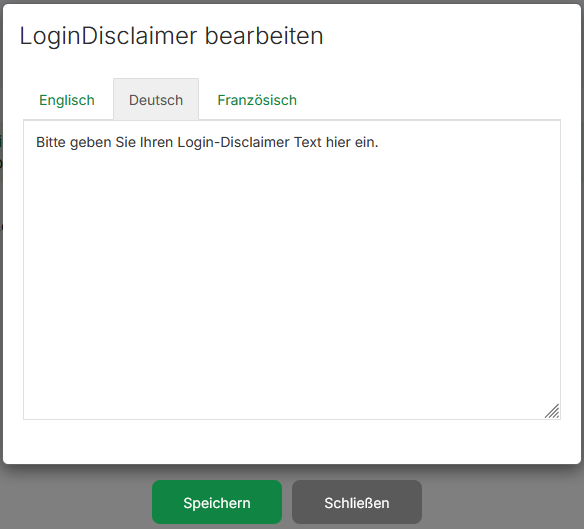
First, you must define the text that should be displayed to the users.
- Navigate to
Administration > Templates > Disclaimer > Login Disclaimer. - Enter the desired text for your terms of use here.
- The text must be entered and saved separately for each supported language (German, English, and French).
Step 2: Globally activate the login disclaimer
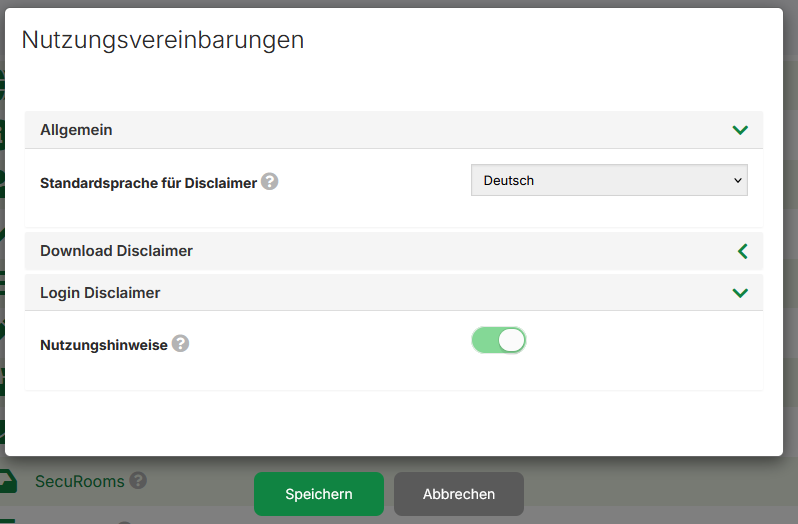
After the content has been defined, the function must be activated globally for the system.
- Navigate to
Administration > System > Usage Agreements. - Activate the checkbox for the "Usage notes" option.
- Under "Default language for disclaimer", select the language that should be displayed by default if a user has not set a preferred language.
As soon as both steps are completed, your defined disclaimer will be displayed to new users upon their first login.