📋 Registration
You have the option to allow users to register themselves and create an account on your FTAPI server. You can restrict who is allowed to create an account for themselves. Additionally, you can also enable anonymous self-registration.
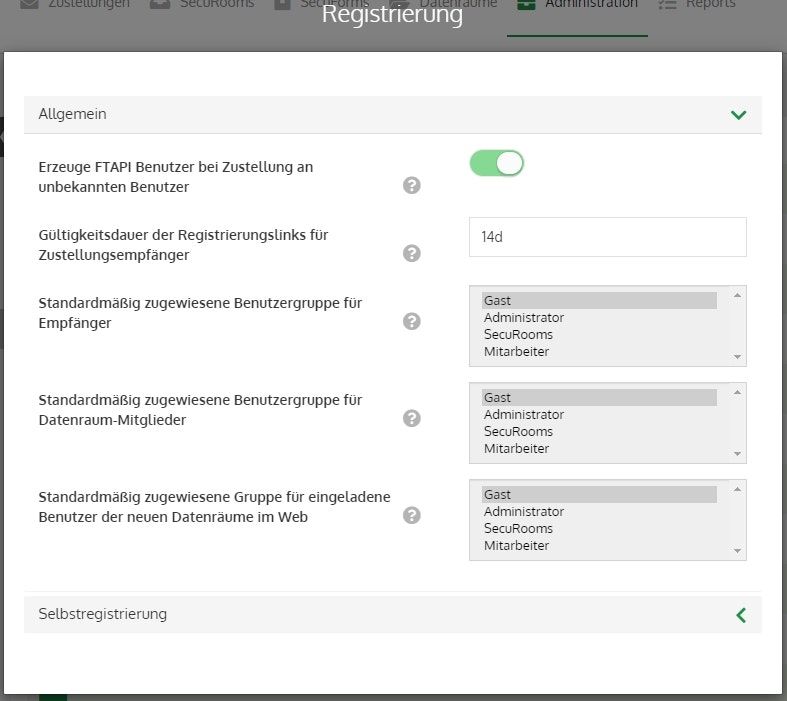
General
Create FTAPI user upon delivery to unknown user
If this setting is disabled, no deliveries or SecuRooms invitations are allowed to email addresses that are not assigned to an existing FTAPI user.
Validity period of the activation link for delivery recipients
Defines how long an activation link for an account is valid. The default value is 24h.
Default assigned user groups for recipients
Here you can specify to which group a recipient created in this way should be assigned.
Default assigned user group for SecuRooms members
Here you can specify to which group a SecuRooms member created in this way should be assigned.
Default assigned group for invited users of new SecuRooms in the web
Here you can specify to which group a SecuRooms member created in this way should be assigned.
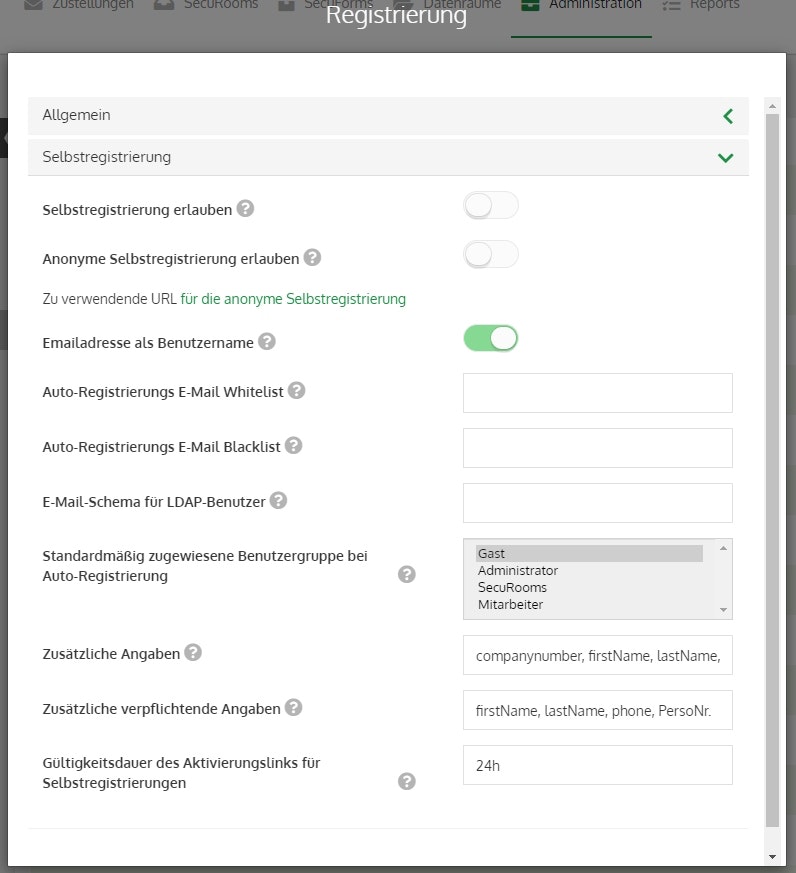
Self-registration
Allow self-registration
Enables/disables self-registration.
Anonymous self-registration
Enables/disables anonymous self-registration. You can find the URL for the form under "URL to be used for anonymous self-registration".
For anonymous self-registration to work correctly, the following domain must not be included under "Auto-registration email blacklist": "@anonymous.com"
Email address as username
Enables/disables the restriction that the username must be the same as the email address.
Auto-registration email whitelist
With this option, you can restrict which email addresses can be used for self-registration. This ensures that only authorized users can set up an account on your system.
Tip: If you have your own company domain, it makes sense to restrict auto-registration to these domains.
You enter this as follows: *@ftapi.com . This makes it possible only for people whose email address ends in @ftapi.com to create a user account via self-registration.The domain restriction can also be further specified, e.g.: *.entwicklung@ftapi.com . Only people from the development team can complete the self-registration.
Auto-registration email blacklist
With this option, you can explicitly exclude email addresses from self-registration. These addresses are also excluded if they are included under the "Auto-registration email whitelist" point.
Tip (continued)
If "@ftapi.com" is included in the "Email address restriction" point, the development team could, for example, be excluded again by entering "*.entwicklung@ftapi.com" under "Blocked email addresses".
Email schema for LDAP users
Email addresses that fall into the criteria defined here are automatically created as LDAP users. To use this function, you must have configured at least one LDAP server.
Default assigned user groups for auto-registration / for recipients / for SecuRooms members
Here you can specify to which group a self-registered user created in this way should be assigned.
Additional information
The fields selected here are displayed to the user when they register and can be filled out voluntarily.
Additional mandatory information
The fields specified here must be filled out by the registering user, otherwise the registration will fail.
Validity period of the activation link for self-registrations
Defines how long an activation link for an account is valid. The default value is 24h.