
❓ License Management: Understanding SecuMail and SecuRooms Licenses
A distinction is made between SecuMail and SecuRooms licenses.
A license is assigned to a user based on their group membership.
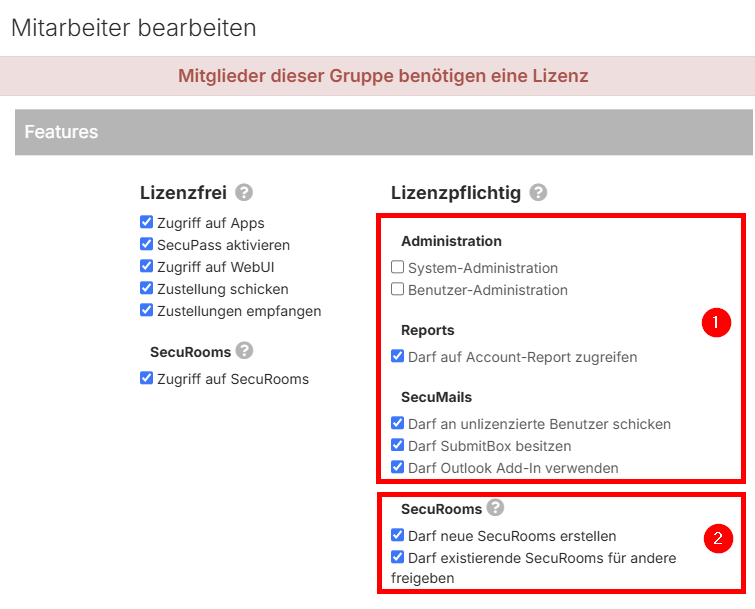
- As soon as at least one license-required feature is activated at the group level under (1) or (2), all members of this group require a corresponding license.
- A user account requires a maximum of ONE SecuMail or SecuRooms license, regardless of how many (license-required) groups they are in.
- A deactivated account does not require a license, but it cannot receive SubmitBox deliveries, for example.
- If an account is removed from all license-required groups, all assigned licenses are revoked.
The current status of an account can be viewed in the user management section:
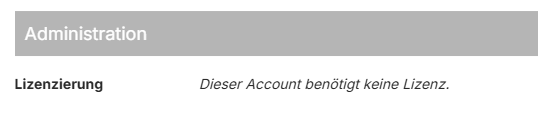
or

Trial Licenses (SecuMail)
If there are more users in groups with active license-required features than there are available SecuMail licenses, the excess accounts will receive a 30-day valid trial license. Administrators will be notified of this via email, and the account will be displayed in the user management section as shown in the following image:

All features can continue to be used during this period. After the period expires, however, a license is mandatory for the user, otherwise all features (including non-licensed functions) will be deactivated. This account may need to be moved to a non-licensed group (e.g., "Guest") in order to use the basic functions (login to WebUI, receiving deliveries, etc.).
SecuRooms Licenses
If your license contains exclusively SecuRooms licenses, no license-required SecuMail features may be activated in the groups.
The permissions of a pure SecuRooms group can look like this, for example:
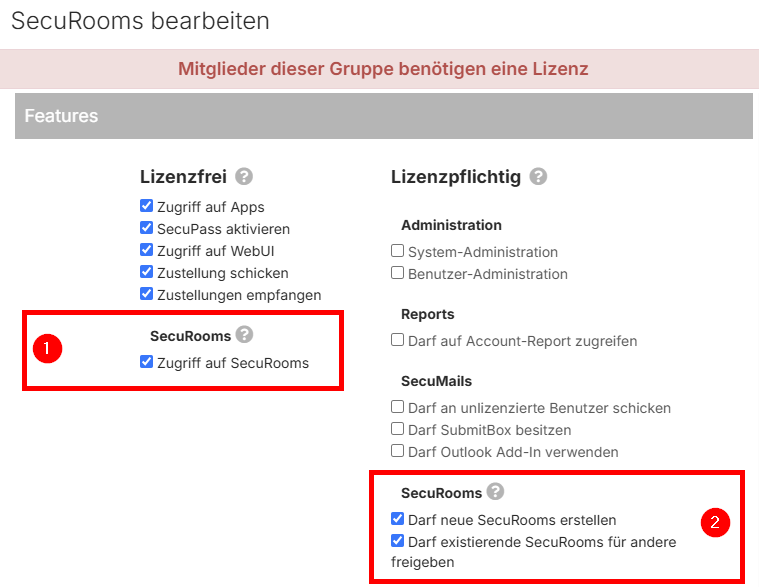
Access to SecuRooms (1) does not require a license. However, a SecuRooms license is required for creation and user management within the SecuRooms (2).