
📋 FTAPI Gateway: Implementation Assistant
Mailflow scenarios
There are two basic mailflow scenarios into which FTAPI can be implemented. Both scenarios are outlined and examined below, both inbound and outbound. Please first check which of the sketches corresponds to your mailflow and then decide which implementation is the right one for you.
Scenario A: Mail server (cloud or on-prem) with upstream gateway
Sketch without FTAPI
| Inbound | Outbound |
 |  |
Sketch with FTAPI - Option A1 (Standard routing)
| Inbound | Outbound |
 |  |
In this scenario, a security gateway (e.g., Hornet, Trend Micro, Barracuda, Sophos) is placed in front of the mail server.
FTAPI is integrated directly between the security gateway and the mail server.
Inbound: Emails arrive from the internet at the security gateway, are checked there, and then forwarded to FTAPI. After decryption, FTAPI forwards the emails to the mail server (Note: decryption for S/MIME and PGP).
Outbound: The mail server forwards emails to FTAPI, where they are signed/encrypted. They are then sent on to the security gateway and from there to the internet.
Sketch with FTAPI - Option A2
| Inbound | Outbound |
 | |
This scenario builds on A1 but extends the process by adding a return path to the security gateway.
The special feature: Decrypted emails pass through the security gateway again so that they can be scanned again after decryption.
Inbound: Emails coming from the internet first reach the security gateway. From there, they are forwarded to FTAPI for decryption (Note: decryption for S/MIME and PGP). They then go back to the security gateway for virus/spam scanning before being delivered to the mail server.
Outbound: The mail server forwards emails to FTAPI for signing/encryption. After that, the emails are sent to the security gateway and sent from there to the internet.
Note: To prevent loops, you must ensure in the security gateway that emails are only forwarded to FTAPI once.
Scenario B: Standalone cloud mail server without upstream gateway
Sketch without FTAPI
| Inbound | Outbound |
 |  |
Sketch with FTAPI
| Inbound | Outbound |
 | 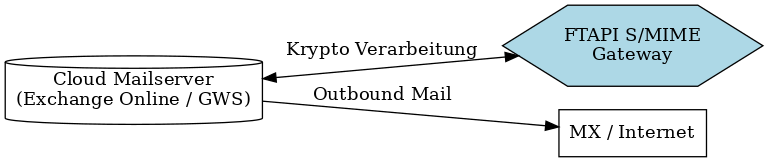 |
In this scenario, there is no separate security gateway. The mail server (e.g., Exchange Online or Google Workspace) is connected directly to the internet.
FTAPI is connected as a bidirectional crypto gateway via routing rules or connectors.
Inbound: Emails reach the cloud mail server from the internet. From there, they are forwarded to FTAPI for decryption and then back to the mail server for delivery.
Outbound: The cloud mail server hands emails over to FTAPI, where they are encrypted/signed. They then go back to the mail server and are sent from there to the internet.
Requirements for implementation in the mailflow
Communication & accessibility
- FTAPI Gateway is accessible from your network both from the mail server (cloud or on-prem) and from the security gateway (if present).
- Outgoing SMTP connections on port 25 (optionally 587) are allowed.
- DNS resolution works (forward and reverse lookup for FTAPI Gateway).
- When additionally using S/MIME: To ensure S/MIME signatures can be correctly checked and displayed, emails should remain unchanged on the path between sender and recipient.
Security gateways or mail filters that change the content or specific header fields can affect the validity of the signature.
If components such as spam filters or DLP systems are used in the mailflow, we recommend configuring them so that S/MIME-signed messages are forwarded in their original state.
Routing / Connectors
- The mail server and the security gateway must be configurable so that emails are routed via FTAPI.
- Loop protection (especially in scenario A2): The security gateway must only forward emails to FTAPI once. This can be done, for example, by checking the FTAPI hostname in the header. Ideally, check in advance what options your security gateway offers.
Test configuration
- For the initial test, the mailflow should be adjustable so that only specific recipients or domains run via FTAPI (e.g., internal test users or a test domain).
S/MIME: Certificates / encryption material
- S/MIME certificates to be imported must be ready.
- If S/MIME certificates are to be obtained via FTAPI, a TXT record for validation at SwissSign must be set in the DNS of the customer domain(s) in whose name emails can be sent.
Roles & contacts
- Those responsible for the mail server, security gateway (if present), and firewall must be reachable. These roles should have the permissions to make the necessary routing and connector adjustments.
Requirements for FTAPI OnPremise operation
- For the FTAPI solution, a VM with the latest build of Almalinux version 9 is required. The VM should have at least 2 vCPU, 8 GB RAM, and 10 GB of hard disk space available.
- DNS and name resolution for FTAPI must work (forward/reverse lookup).
- A valid SSL certificate must be available for the FQDN of the service or port 80 must be (temporarily) open inbound to request certificates via Let's Encrypt.
Submit implementation data
To ensure we can optimally prepare your implementation, we still need some information about your environment.
Please enter this into our SecuForm.
This way, we ensure that at the appointment, only implementation and testing are required – without additional follow-up questions.