
📋 SecuRooms: Setting up and managing a mandatory deletion period for data rooms
Setting a mandatory deletion period for data rooms
Administrators can set a mandatory deletion period for all data rooms via the FTAPI administration. This serves the central implementation of compliance requirements such as the GDPR.
Configuration of the mandatory deletion period
The mandatory deletion period is set in the administrator's SecuRooms settings:
1. Navigate to Administration > SecuRooms.
2. Click on the "Manage" button.

3. Set the desired deletion period (in days).
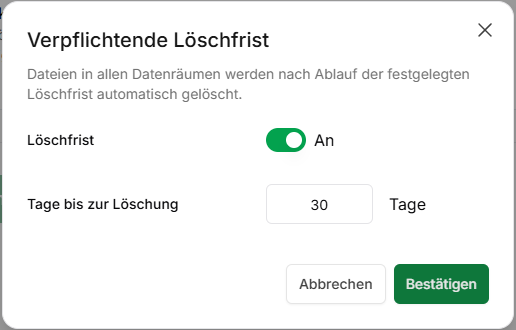
When setting or changing the deletion period for the first time, a double confirmation is required, as this setting affects all data rooms in the instance.
Priority rules for the mandatory deletion period
The mandatory deletion period acts as a compulsory upper limit and is applied to all data rooms.
- Upper limit: The individual deletion period of a data room must not exceed the mandatory defined period.
- Existing rooms without a period: The mandatory deletion period is automatically assigned to these rooms.
- Existing rooms with a longer period: Are adjusted to the mandatory deletion period.
- Existing rooms with a shorter period: Retain their shorter, individual deletion period.
- Newly created rooms: Receive the mandatory deletion period by default.
Example: Mandatory deletion period: 30 days
- Room A (without a period) → receives 30 days
- Room B (individual period 90 days) → is adjusted to 30 days, as the old value is above the maximum.
- Room C (individual period 7 days) → retains 7 days (remains unchanged, as the old value is below the maximum).
- Changing Room C to 45 days → not permitted (exceeds the mandatory upper limit)
Interaction with the Recycle Bin
Files that are deleted due to the mandatory or individual deletion period are moved to the Recycle Bin, provided it is activated for the FTAPI system.
- If the Recycle Bin is activated, the files remain there for another 30 days before they are permanently deleted.
- If the Recycle Bin is deactivated, the files are irrevocably deleted by the deletion period.
Effects of deactivation
If the mandatory deletion period is removed by the administrator, no changes are made to existing individual periods:
- Data rooms with an individually set deletion period retain their value.
- Data rooms that previously had no individual period and had only adopted the mandatory period are reset to "no deletion period".
- Newly created data rooms are not assigned a deletion period.
Monitoring and logging
Setting or changing the mandatory deletion period as well as the resulting changes to the individual data rooms are documented in the activity log of each affected data room.
Related articles
📋 SecuRooms: Managing the Recycle Bin for deleted files