
📋 SecuRooms: Edit docx files and xlsx spreadsheets directly in the data room
What is new?
SecuRooms allows you to directly view and edit Office documents (in docx format) and spreadsheets (in xlsx format) – without downloading or switching to other programs.
Your benefits
- Fast access: Open Word documents and Excel spreadsheets directly in the browser.
- Direct editing: Make changes immediately – and save your changes directly in the preview.
- Secure collaboration: Work together with other users on documents without files leaving your secure environment.
- Efficient workflow: No switching back and forth between programs, everything stays in SecuRooms.
How it works
- Select file: Open the desired document or spreadsheet in your data room.
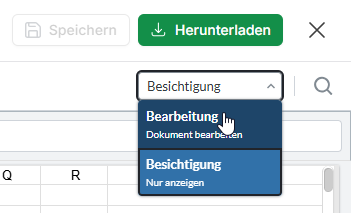
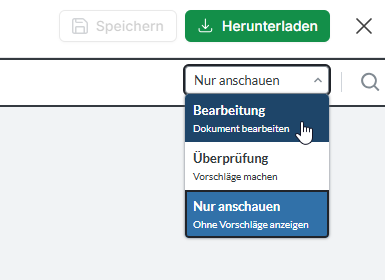
- Edit: Select "Edit" from the dropdown in the top right to make changes directly in the browser.
Editing .xlsx files
Editing .docx files
3. Save: Save your changes directly in the preview so that they are immediately visible to authorized users.
Frequently asked questions
Which file types can I edit?
You can directly edit Office files Word (.docx) and Excel (.xlsx).
Can I edit together with other users?
No, parallel editing is not possible. If a file is edited by multiple users at the same time, only the first saved change can be stored as a file version. All subsequent changes are saved as a new file.
Is my data secure?
Yes, all editing takes place within the protected SecuRooms environment and does not leave FTAPI.
Good to know
This new feature makes collaboration in SecuRooms even easier and more secure. You save time, avoid unnecessary downloads, and always maintain full control over your sensitive data.
Related articles
❓ SecuRooms: Frequently Asked Questions (FAQ) on usage